
What is DataFlow’s Express Service?

Banner-What-is-DataFlows-Express-Service-768x401

What is DataFlow’s Express Service?

DataFlow’s Express Service will expedite your document verification from our standard application turnaround time to within 14 working days.

If you need to complete your verification quickly, this package has been designed to ensure you jump to the front of the queue.

How does this service work?

An Express Service specialist will be assigned to your application to manage the process within 14 working days, along with any necessary follow-ups with the Issuing Authorities.

What are the benefits?

  • 14 working days to process an application
  • Receive dedicated service support
  • Our team will extensively follow-up with the Issuing Authorities as required

Do I have to pay additional charges for this service?

Yes, the Express Service is at an additional cost to the regular package fee. You can find the exact fee for the Express Service on our portal and it will be added to the PSV charges.

If my verification take longer than 14 days, is there a refund policy?

Yes, there is a refund policy for applications delayed beyond 14 working days. If this happens, please raise a ticket with our Support Team so we can investigate the issue – in case the delay is due to unavoidable circumstances including,  but not limited to,  a lack of response from the  Issuing Authorities for your documents or regional conflict impacting our verification efforts.

You can raise a support ticket here. 

Please Note: Working Days do not include the days where we are waiting for further information from you due to incomplete or insufficient data, which has stopped us from proceeding with your application.

How do I sign up for the Express Service?

Signing up is easy, please visit the DataFlow Group website and follow these steps: 

  1. Choose ‘Verification Services
  2. Click on ‘Country of Regulator/Organisation‘ i.e. where you are seeking employment
  3. When you start filling out your application form, you will be able to choose the Express Service option from a dropdown menu in addition to your regular package.
Ready to sign up for the Express Service?

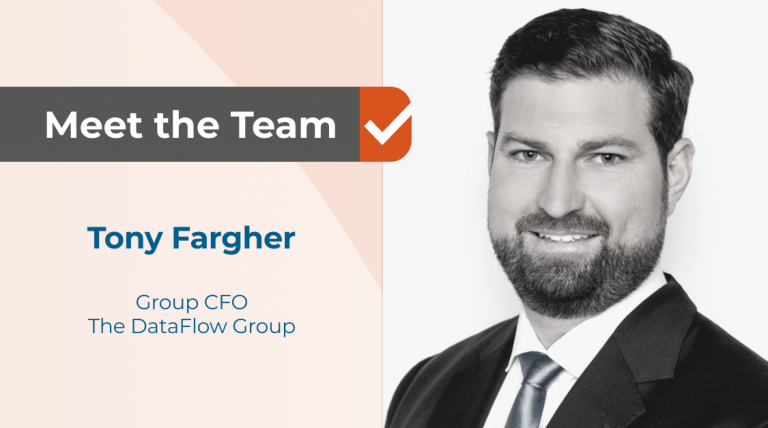
DataFlow Voices: Meet Tony Fargher – CFO

DataFlow-Voices-Tony-Fargher-1200x627-1-768x428

Welcome to our blog series, DataFlow Voices! In this series, we feature one-on-one interviews with our team members from around the globe. Get to know our team, learn about their experiences and find out what it’s like working at DataFlow.

Meet Tony Fargher, Chief Financial Officer (CFO) of the DataFlow Group. Originally from Wellington in New Zealand, Tony is based out of our Dubai office. Our CFO’s greatest strengths are his razor-sharp analytical ability and stellar interpersonal skills, which have helped him build successful relationships throughout the company.

Find out what a day in the life of a CFO is like and hear more about Tony’s passion for data verification to make the fight against fraud more effective:

Hi Tony! Can you tell our readers more about what it’s like to work at DataFlow?

I like coming to work each day knowing that what we do protects people and communities and changes lives for the better.

Firstly, we ensure that professionals seeking to move into a new country are who they say they are through Primary Source Verification (PSV). If they attempt to use fraudulent documents/credentials, we will help prevent this from happening, therefore protecting the people that would have otherwise been impacted. This is very important in industries such as healthcare, engineering and education/immigration in particular.

For the vast majority of professionals not attempting to use fraudulent documents, we offer services via our TrueProfile.io platform that will help and support them in the life-changing process of moving to a new country to further their careers and gain new experiences.

Being part of a company that has, at its heart, the core objective of protecting and helping people makes working at the DataFlow Group fulfilling.

What did you do before joining the DataFlow Group?

I am a qualified Chartered Accountant and hold a 1st Class Honours degree in Accounting and Commercial Law. Before joining the DataFlow Group in 2018, I spent nearly seven years at Serco Group plc, a FTSE 250 UK listed company, as Finance Director. There, I oversaw their Integrated Services Sector across the Middle East.

Prior to that, I worked as the Finance Director of the Mubadala subsidiary John Buck International in Abu Dhabi. Before that, I worked with Goldman Sachs Bank in London and PwC in Wellington, New Zealand, my hometown.

What do you love most about what you do?

As the CFO, I am lucky to be able to engage with our people and teams across the entire company. I typically have daily interactions with DataFlow staff from Operations, IT, Sales, Account Management and HR, in addition to my amazing Finance team.

This means that there is a huge amount of variety in each day and week as we work together across functions to deliver in the best way that we can for the thousands of applicants that rely on us each month to verify their documents and provide them with high-value services.

Can you tell us a fun fact about you, Tony?

The story of how I proposed to my wife is quite unusual. We were on holiday in Jordan and on a day trip to Wadi Rum in the middle of the desert. I somehow found myself proposing to her when we were both sitting on the backs of different camels at sunset… The ring transfer, in hindsight, was quite a high risk!

Stay tuned to our DataFlow Voices blog series to hear more from DataFlow colleagues like Tony Fargher about their career journeys, what it’s really like working at the DataFlow Group, and what they value most about their impact on our organization, customers, clients and mission.

Read about our other team members in the DataFlow Voices series:

What is DataFlow’s Applicant Assist Service?

Banner-What-is-dataflows-applicant-assist-serviceShutterstock_2159105479-768x401

What is DataFlow’s Applicant Assist Service?

The Applicant Assist service will help you complete your submission in just a fraction of the usual time. You do not need to take the time to fill out the detailed application form, as after you fill in only some basic information, one of the DataFlow specialists will complete the remaining form on your behalf.

How does the service work?

When you opt for our Applicant Assist service, you only need to fill in some basic information on your application form, depending on the Regulator you are applying for.

After inputting this information, upload your documents and just sit back and relax. The DataFlow team will complete the remaining application form on your behalf.

Once we receive your application submitted under the ‘Applicant Assist’ package, one of our Applicant Assist specialists will scan your application to ensure there is no missing information or documents. Once checked, our team will complete your application.

How does this service benefit me?

  • Saves you precious time – Minimal information to be filled by you, which would take you less than 15 minutes approximately as opposed to the usual time of up to an hour approximately
  • Receive prioritized communication for any prominent missing pieces of information/documents that can potentially delay your case
  • The DataFlow team will complete your application for you

What additional charges can I expect?

Yes, the Applicant Assist service is an additional cost to the regular package fee. You are requested to check the application form to find out the exact fee you must pay in addition to this service.

What other support can the Applicant Assist team offer?

The Applicant Assist team will contact you in case of any document insufficiency or requests for additional documents. This will help DataFlow start the verification process without any delay.

 How can I sign up?

Signing up is easy. Please visit the DataFlow Group website and follow these steps:

  1. Choose Verification Services
  2. Click on Country of Regulator/Organisation i.e. where you are seeking employment.
  3. When you start filling out your Application form, you can choose Applicant Assist as an additional service.

Ready to sign up for the Applicant Assist service?

How To Apply for Verification for the Oman Society of Engineers (OSE)

Banner-How-to-Apply-for-Verification-for-the-Oman-Society-of-Engineers-768x401

Here is a step-by-step guide on how to apply for verification for the Oman Society of Engineers (OSE).

We discuss:

Let’s Begin

Go to www.dfgateway.com

1. If this is your first time registering with us:

  • Enter the email you wish to use to sign up for a new account.
  • Read the terms and conditions
  • Tick ‘I agree to the Term & Conditions
  • Click ‘Confirm
  • You will receive an email with an activation link which you need to click to set up your new password.
  • Click ‘Save & Continue


2. If you have previously registered with the DataFlow group:

  • Simply log in with your email and password.
  • Once logged in, you will arrive at your dashboard.

Licensing Details

Note: You must enter all data in English.

  • Select ‘Start Application’ at the top left of your screen to create a new case. From the ‘Authority Name’ dropdown list, select Oman Society of Engineers.
  • Select your application category from the dropdown list.
  • Under ‘Package Details’, select an option according to the number of educational qualifications and employment certificates you want to verify.
  • If you have more documents to verify from any type of check, simply click on the plus sign (+) under ‘No. of Documents’ to reach the required count.


Note: Please be careful as the package selection cannot be changed once you move to the following section. If you select the wrong category type, you will need to start a new application.

Personal Details

  • Click ‘Upload’ and drag or upload a clear scanned copy of your passport in JPEG or PNG format. If the file uploaded is not clear, you will get 2 options to choose from:
    • Try again (to upload another file)
    • Enter manually (your passport details)
  • Check the details and make any updates if required. Click ‘Submit’. Please double-check these details very carefully, as errors in this data will likely cause delays in the processing of your case.
  • Complete the fields marked with an asterisk (*)
  • Enter your mobile phone number and generate a one-time password (OTP).
  • Enter the OTP received by SMS to validate it, then click on ‘Next’.

Verification Details

  • Fill in the details of each check. Always start with the name of your University or previous employer. Here, a pop-up will open to allow you to enter the name of your university, institute, employer, or any other organization that issued your document. If we have the name on file, we will pre-populate some of the data for you.
  • If we do not recognize the name, click on ‘I cannot find my Issuing Authority from the List’ to enter the name and country manually. If there are no mandatory requirements for the selected issuing authority, tick the check box and select ‘Submit’.
  • If you see any mandatory requirements for the selected issuing authority, read them carefully and provide all the required information and documents. Failing to comply with the list will result in delaying your report.
  • For each check, complete the fields marked with an asterisk and upload the mandatory documents. For each document you upload, you need to specify its type from the dropdown list. To move from one section to another, click ‘Next’. Click ‘Back‘ to go back to a previous page to make edits or corrections. If, at any time, you would like to leave the application, click on ‘Save’ to avoid losing the data. You can find your application in the ‘Check Your Status’ on the dashboard page.

Letter of Authorization (LOA)

  • Click on ‘Consent’, scroll through the letter, then click on ‘Consent’. Click on ‘Download PDF’ if you want to keep a copy of this letter for your reference. Click ‘Finish’ then ‘Next’.

Before Submitting Your Application for Verification for the Oman Society of Engineers (OSE)

  • After completing all the sections, go through the provided details.
  • If you want to make any changes or corrections, click on ‘Edit’ and you will be directed to the desired section.
  • You may also download a copy of the entire application for future reference by clicking the ‘Download’ button at the bottom of your application.

Ready to submit your application for verification for OSE?

Note: You cannot make changes to your application once you make the payment.

  • Select the ‘SUBMIT APPLICATION’ button, review the amount and then click on ‘SUBMIT APPLICATION’.
  • Select your preferred payment method.
  • Enter the details of your credit card and click on ‘pay’.
  • That’s it!

Once the verification of your case is completed, we will notify you by email and your report will become available for OSE.

Watch a detailed step-by-step guide on how to apply for verification for the Oman Society of Engineers (OSE) here:

Ready to apply for verification for the Oman Society of Engineers (OSE)?